Technology Shouldn’t Create Visual Chaos
Modern work requires multiple devices, chargers, monitors, and peripherals. Left unmanaged, the cables alone can make an office feel cluttered and stressful. The goal is to make technology invisible in your space while keeping it fully functional.
Cable Management Fundamentals
Under-Desk Cable Trays
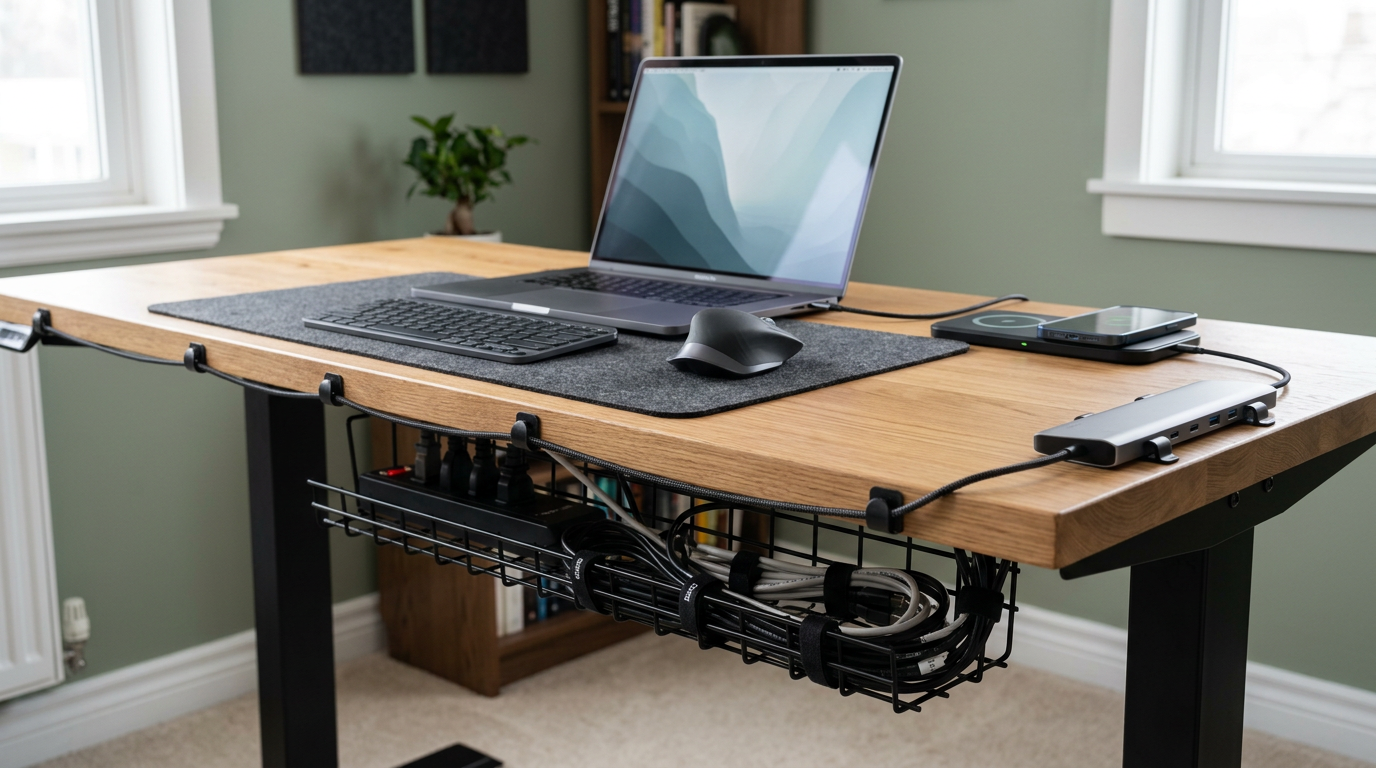
A mesh or solid cable tray mounted under your desk is the single most effective cable management tool. It catches all cables in one contained channel, lifting them off the floor and out of sight. Most trays screw into the underside of the desk in minutes.
Cable Clips and Ties
Adhesive cable clips attached to the back edge of your desk route cables neatly from the tray to your devices. Velcro ties (not zip ties — they’re reusable) bundle excess cable length into tidy loops.
Cable Sleeves
For visible cable runs — from desk to wall outlet, for instance — a fabric cable sleeve bundles multiple cables into one clean tube. Choose a color that matches your wall or floor for maximum invisibility.
Power Strip Mounting
Mount your power strip to the underside of your desk or the side of your desk leg. This keeps it accessible but hidden. Use a strip with wide spacing to accommodate bulky adapters.
The One-Cable Desk
USB-C Docking Stations
Modern USB-C docks connect your laptop to monitors, keyboard, mouse, ethernet, and power through a single cable. Plug in one cable to start your workday, unplug one cable to end it. The dock lives behind the monitor or under the desk.
Wireless Peripherals
A wireless keyboard and mouse eliminate two cables immediately. Bluetooth or USB dongle — both work. Pair with wireless charging pads built into your desk or a small wireless charger hidden behind the monitor.
Wireless Charging Spots
A Qi-compatible charging pad on your desk, styled as a desk accessory rather than tech gadget, charges your phone without adding cable clutter. Some desk pads include built-in wireless charging.
Smart Office Accessories
Smart Lighting
A desk lamp controlled by voice or app lets you adjust brightness and color temperature without touching a switch. Program scenes — “Focus” at 4500K, “Evening” at 2700K — for one-command lighting changes.
Smart Speakers as Office Assistants
A compact smart speaker handles timers, reminders, calendar queries, quick calculations, and music — all hands-free. Choose one that matches your office aesthetic.
Smart Plugs
Connect your desk lamp, monitor, and speakers to a smart plug. One command or schedule turns your entire office on or off. This supports the daily closing ritual that separates work from personal time.
Air Quality Monitors
A small air quality sensor tracks CO2, humidity, and temperature — all of which affect cognitive performance. When CO2 rises, it’s time to open a window. Data-driven comfort.
Desk Accessories That Deserve Space
Monitor Stand with Storage
A monitor riser that elevates your screen to proper ergonomic height while providing a shelf underneath for keyboard storage, supplies, or a dock.
Desk Pad
A large desk pad in leather, felt, or cork unifies your desk surface, protects the finish, reduces mouse noise, and looks polished. It’s one of the highest-value desk accessories.
Headphone Stand
A dedicated stand keeps your headphones accessible and off the desk surface. Wall-mounted hooks work too. It’s both organized and decorative.
USB Hub
A small USB hub at desk level provides easy access to ports for flash drives, external devices, and charging cables without reaching behind the monitor.
Aesthetic Integration
The key to a tech-friendly office that still feels like a designed space is concealment and coordination. Match your accessories’ colors (black with black, silver with silver). Hide functional items behind prettier ones. Choose tech accessories from brands that care about design, not just function.
Your office can be fully equipped and beautifully designed simultaneously. The technology should serve you quietly while the design speaks.